
Salesforce and AWS EventBridge: Designing a Real-Time Event-Driven Architecture
How to decouple your core CRM, bypass API limits, and sync data seamlessly with external microservices using native event streaming. Learn how to decouple your Salesforce core CRM from external microservices using AWS EventBridge and Platform Events to achieve real-time synchronization without hitting API limits.
André Rödel
5/19/20264 min read
Every growing enterprise eventually faces the same architectural bottleneck: the "spiderweb" integration. It starts simply enough: a custom REST call from Salesforce to an external billing system whenever an Opportunity is won. Then, an AWS Lambda function needs to know when a Contact is updated. Soon after, an on-premises ERP requires real-time inventory updates.
Before you know it, your Salesforce Org is trapped in a matrix of synchronous, point-to-point Apex HTTP callouts.
As a Salesforce Developer/Architect, you quickly realize this approach is fundamentally flawed. It introduces tight coupling, increases transaction times, exposes you to external system downtime, and relentlessly eats away at your Governor Limits.
If you want to build a truly resilient, scalable enterprise ecosystem, you have to move from a request-response mindset to an Event-Driven Architecture (EDA). And when it comes to bridging the gap between Salesforce and AWS, AWS EventBridge combined with Salesforce Platform Events is the gold standard.
Let’s dive into how this architecture works and how to design it properly.
1. Why AWS EventBridge? (Moving Past Traditional REST)
In a traditional integration pattern, Salesforce acts as the orchestrator, hitting external APIs directly. If the receiving microservice is down, the Salesforce transaction fails, or you have to build complex, custom retry logic using asynchronous Apex or Scheduled Flows.
AWS EventBridge changes the paradigm completely by acting as a serverless event bus. Instead of Salesforce knowing who needs the data, Salesforce simply shouts into the room: "Hey, this event just happened!"
EventBridge listens, filters, and routes that message to the correct consumer—whether that’s an AWS Lambda function, an SQS queue, a Kinesis stream, or an external third-party API.
The immediate benefits are game-changing:
Asynchronous Decoupling: Salesforce fires the event and immediately moves on. The user interface remains lightning-fast because the CRM isn't waiting for an external server to reply.
Bypassing API Limits: Traditional inbound REST calls consume your daily API limits. Pushing data out via events routes through highly scalable streaming allocations instead.
Resilience by Design: If a destination microservice goes offline, AWS EventBridge (or attached SQS dead-letter queues) handles the retry logic, not Salesforce.
2. The Native Blueprint: Event Relay for AWS
Years ago, connecting Salesforce to AWS EventBridge required middleware (like MuleSoft) or a custom AWS Lambda function utilizing the Pub/Sub API or CometD to poll Salesforce for changes.
Today, we have a native, low-code solution: Event Relay for AWS.
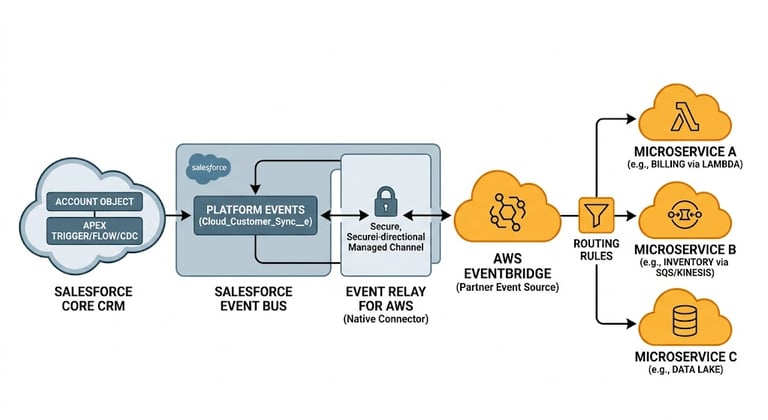
This native feature allows Salesforce to stream Platform Events or Change Data Capture (CDC) events directly to AWS EventBridge using a secure, bi-directional channel managed by Salesforce and AWS behind the scenes.
The Data Flow Architecture:
The Triggering Event: A business action occurs in Salesforce (e.g., a new Customer Account is created).
The Platform Event: An Apex trigger, Flow, or native CDC publishes a Platform Event (e.g., Cloud_Customer_Sync__e).
The Event Relay: The native Event Relay service automatically picks up the published event from the Salesforce event bus and securely forwards it to AWS.
The Partner Event Source: AWS EventBridge receives the message via a dedicated Partner Event Source channel.
The Routing Rules: EventBridge evaluates rules configured by your AWS team and routes the payload to the specific microservices that care about customer data.
3. Designing the Event Payload: Best Practices
When defining your Platform Events for an AWS integration, you have two primary design patterns: Data-Heavy (State Carrier) or Data-Light (Notification Only).
Option A: Data-Heavy (State Carrier)
The event payload contains all the data the external system needs (e.g., Account Name, ID, Address, Tax Number, Billing Info).
Pros: External microservices can process the data immediately without calling back into Salesforce.
Cons: You run the risk of hitting the Platform Event payload size limit (typically 1 MB). If fields change in the future, you have to modify the event schema.
Option B: Data-Light (Notification Only)
The event contains only the record ID and the action type (e.g., RecordId: 001xx00000XyZ, Action: UPDATE).
Pros: Lightweight, incredibly fast, and schemas almost never change.
Cons: Every microservice that receives the event must immediately turn around and make an inbound REST API call back to Salesforce to fetch the data they need. This can quickly exhaust your inbound API limits if event volume is high.
Architect’s Recommendation: Aim for a hybrid approach. Include the core immutable identifiers and essential transactional fields in the event payload to minimize downstream callback loops, but avoid putting entire text areas or massive relationship maps into a single event.
4. Real-World Pitfalls to Plan For
An architect's job isn't just knowing how to build a system; it’s knowing how it will break. Here is what you need to design for on Day One:
Event Ordering
In a distributed event-driven system, events can occasionally arrive out of order. If a user updates an Account name twice in rapid succession, Microservice A might receive the second update before the first one due to network routing.
Solution: Always include a timestamp or an incremental sequencing flag (like a system modification time or event replay ID) in your payload so external systems can ignore stale data.
Idempotency
Network blips happen. Sometimes, Salesforce might send an event twice, or AWS EventBridge might deliver it twice to a target microservice.
Solution: Ensure your external microservices are idempotent. They should check the incoming Event UUID or Salesforce Record ID + Timestamp before processing to make sure they aren't executing duplicate logic (like creating a duplicate invoice).
Final Verdict
Switching to an event-driven architecture with Salesforce and AWS EventBridge requires a shift in how you think about data integrity and system boundaries. However, the reward is an incredibly resilient, modern ecosystem where Salesforce focuses entirely on being a high-performance CRM, while your external microservices scale independently in the cloud.
Stop building brittle REST bridges. Start streaming events.
Connect
Reach out for feedback or technical inquiries.
© 2026. All rights reserved.